Pickup

We want to make sure you have all the information you need in order to place and manage pickup orders.

What does the function involve?

  • A deliverer can collect up to ten parcels, either from your company's pickup locations as agreed with you, or from any address in Germany in an individual collection order (extra charge). For more information about pickups, visit dhl.de/sendung-zur-abholung. (German only)
  • For more than 10 loose parcels or parcels consolidated on wheeled trays, swap bodies or pallets, you can order pickups from the agreed pickup location directly online using the "Pickup" function. Please note that from now on, you must provide an e-mail address when booking if you want to be informed about changes to the way your pickup is processed.
  • The "Pickup" function is also a quick and easy way to order empty wheeled trays, swap bodies or pallets online for your parcel pickups. Please note that from now on, you must provide an e-mail address when booking if you want to be informed about changes to the way your pickup is processed.
  • There is a multi-user company address book which you can use for paid pickup orders.
    If you would like to import address book entries, please use the template in CSV format if possible, which is available in "Downloads" at the bottom of this page. As you are working on the template, please note that the file format must not be changed. We therefore recommend that you use a text editor.
  • The online forms for issuing and managing pickup orders have been updated and the new Pickup 360° API supports automated order placement with the REST web service.
    You can find out more about DHL APIs in the Group API Developer Portal at: DHL Parcel DE Pickup (Post & Parcel Germany)
    If you use an inventory management system or partner software, please ask your relevant point of contact whether the software already supports the Pickup 360° API.
    Please note that from now on, you must provide an e-mail address when booking if you want to be informed about changes to your pickup.

News

May 27, 2025 - New version of the 'Pickup' function successfully installed in the Post & DHL Business Customer Portal On Tuesday

May 27, 2025, we successfully rolled out a new version of the Pickup function with the following changes.

Please note that the features of this version have not yet been activated for all postal code areas. The activation of additional areas will be done gradually.

View of the regular pickups

Under the 'Settings' menu, you will now find the 'Regular Pickups' tab. There you can view your regular pickups in the future:
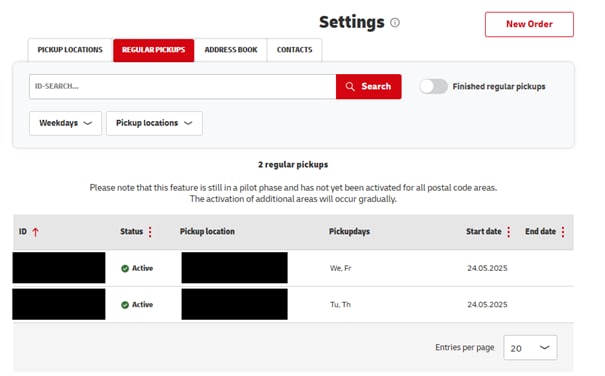
By clicking on one of these regular pickups, you can view the details and receive information about the individual pickup days, for example:
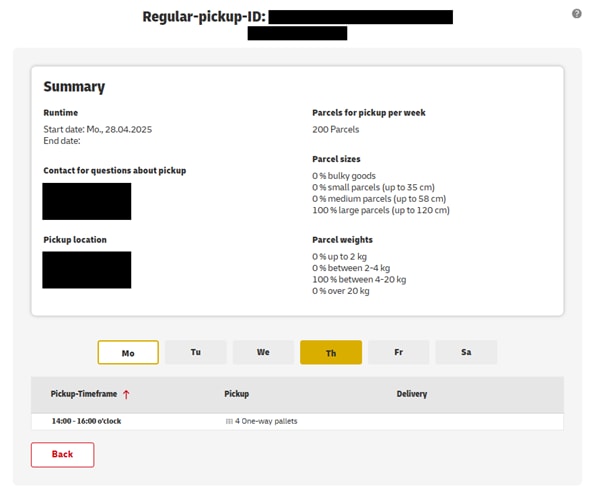
Furthermore, you also have the option to display the individual regular pickups under Pickup Management' > List.'

These will be shown for the current month and the following month:
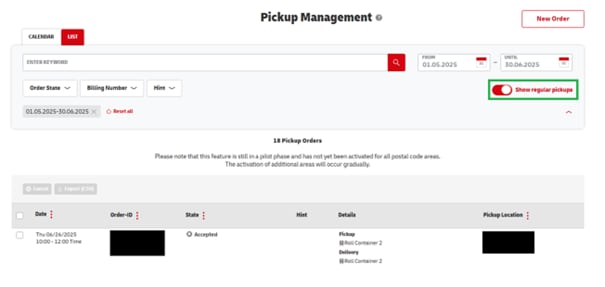
By clicking on an item, you will also receive more information:
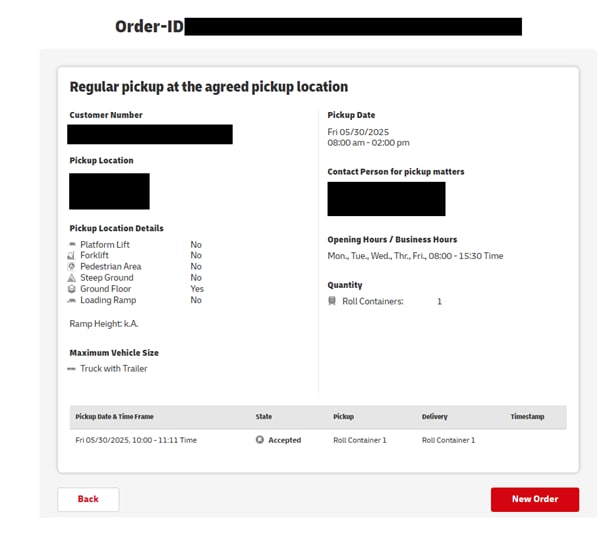
Please note: These are planned data; there will be no status update on whether, for example the pickup was successful. 
UPDATE 26.11.2024 - The planned pickup time window has been removed from the table view again. You can find this information, if available, as usual in the details of the pickup order.

On Tuesday, November 19, 2024, we successfully rolled out a new version of the Pickup function with the following changes:

Revision of Order Management

The "Pickup Management" -> "List" section has been revised and additional information has been included.

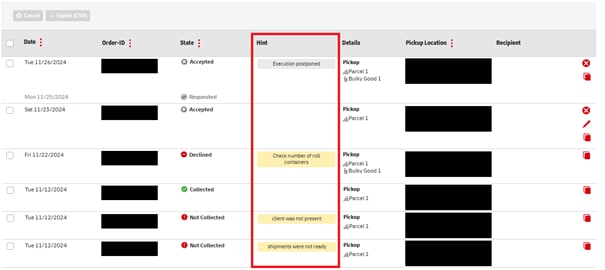
If we have detailed information on a pickup status, you will now find it in the new "Hint" column:

The CSV export function has also been extended to include the "Hint" information.

The "Tracking Number" column has been removed.

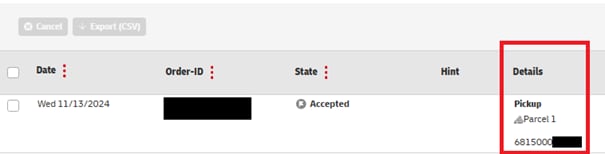
If you order a pickup using the "Pickup from any address in Germany" function and a shipment number is specified/generated, you will now find it in the "Details" column:

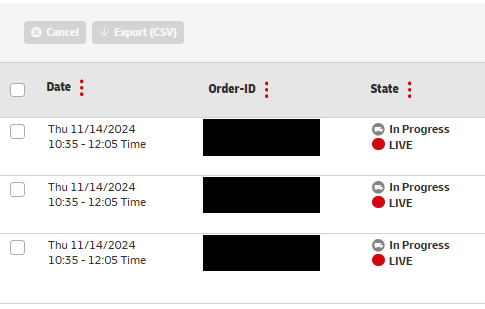
Furthermore, we will now display the planned pickup time frame, if available, for further pickups in the list view:

To further improve performance, the pickup management now initially opens with a preselected period (three months in the past, 14 days in the future).

If you want to search for orders over a longer period, you can remove the filter and the entire possible period will be available to you:

Improvement of Search Functions

The search for pickup locations, addresses, and pickup orders has been revised so that you can find the relevant information even more easily in the future.

On Saturday, May 6, 2023 we successfully installed a new version of the "Pick up" function with the following changes.

  • Configure pickup locations for users
    Business customer portal users can now be selectively authorized for pickup locations. For example, you can authorize employees at a location exclusively for pickups at the associated pickup location.
    To set the pickup location authorizations of a GKP user, select the "Manage Users" item in your personal menu (top right next to your user name). There, select the user whose authorization you want to adjust and make the desired changes in the "Pickup" tab. 
  • Contacts for pickups
    The new "Contacts" area under "Pick up" ➔ "Settings" allows you to maintain contact details, which you can then select with a mouse click for all pickup orders.
    You can also create entered contact details as a new contact when commissioning a pickup.
  • Pickup location details revised
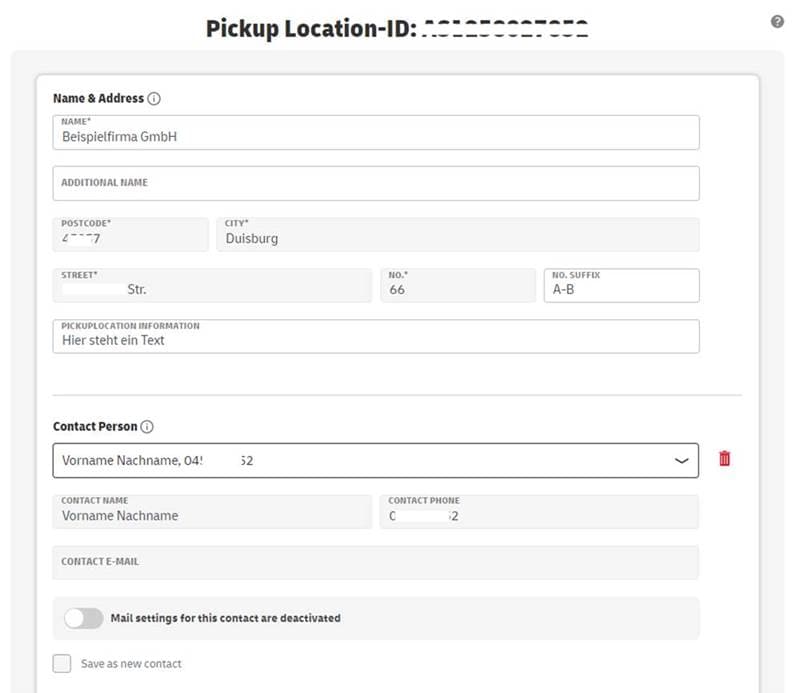
    Under "Pick up" ➔ "Settings" ➔ "Pickup locations" you can still view, complete and edit all pickup location details.
    If you wish, you can permanently link a previously created contact to a pickup location, in which case the data of this contact will be pre-set for orders.

Dear customer, 

We're pleased to announce that you can now use a new function with live tracking of your pick-ups ordered in the Post & DHL Business Customer Portal. 

You can follow the live pick-up status of your individual and occasional pick-up orders. You can track all pick-ups by a deliverer of up to ten items across Germany.

The new live tracking function, based on the familiar shipment tracking service, always provides you with the latest important status information about your pick-up by deliverer: 

  • The currently predicted pick-up window (90 minutes)
  • Remaining stops before your pick-up
  • Location of the deliverer in your area 

You can access the function through pick-up order management here in your individual Post & DHL Business Customer Portal (login for the Post & DHL Business Customer Portal required) or through the "Abholung live verfolgen" (Pick-up live tracking) link button in the optional "Zeitfenster" (Time window) confirmation e-mail that we send to any one or two e-mail addresses on the day of the confirmed pick-up (login for the Post & DHL Business Customer Portal not required).

In rare cases, operational challenges affecting pick-ups (traffic, bad weather, general operational issues) may mean that we are unable to provide full information about the status in live tracking. If this happens, please accept out apologies.

We hope you and your customers enjoy using the new live tracking function.

Sincerely,
The DHL team

On May 19, 2022 a new version of the Pickup function in the Post & DHL Business Customer Portal (GKP) was successfully rolled out. The function as well as the web service were continuously available during the work.

Handling of pickups at agreed pickup locations with more than 10 parcels, bulky goods, roll containers, swap bodies or pallets has been redesigned.

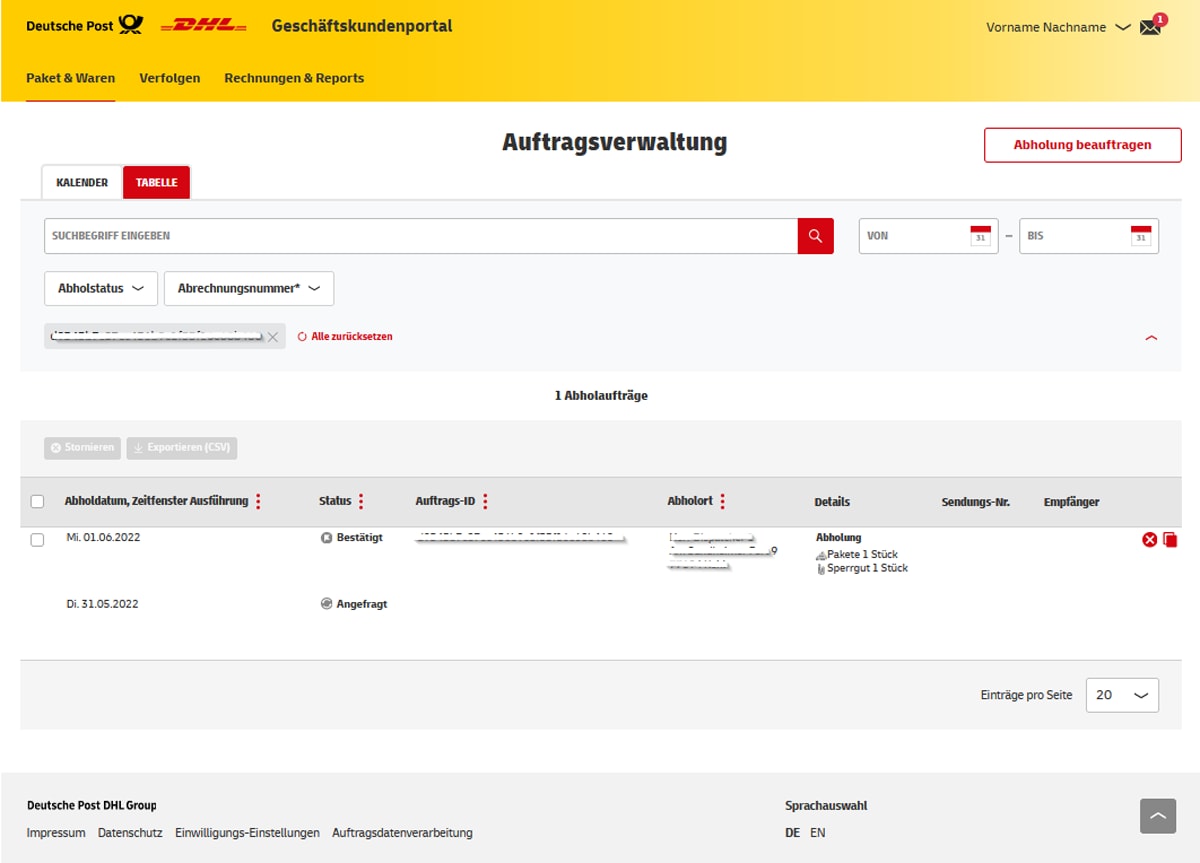
1. The "Order management" is extended by additional information

  • The columns "Details", "Shipment number" and "Recipient" have been added in the order management
  • The delivery of means of transport is now shown separately from their pickup
  • Requests that are still under review are displayed in gray font color

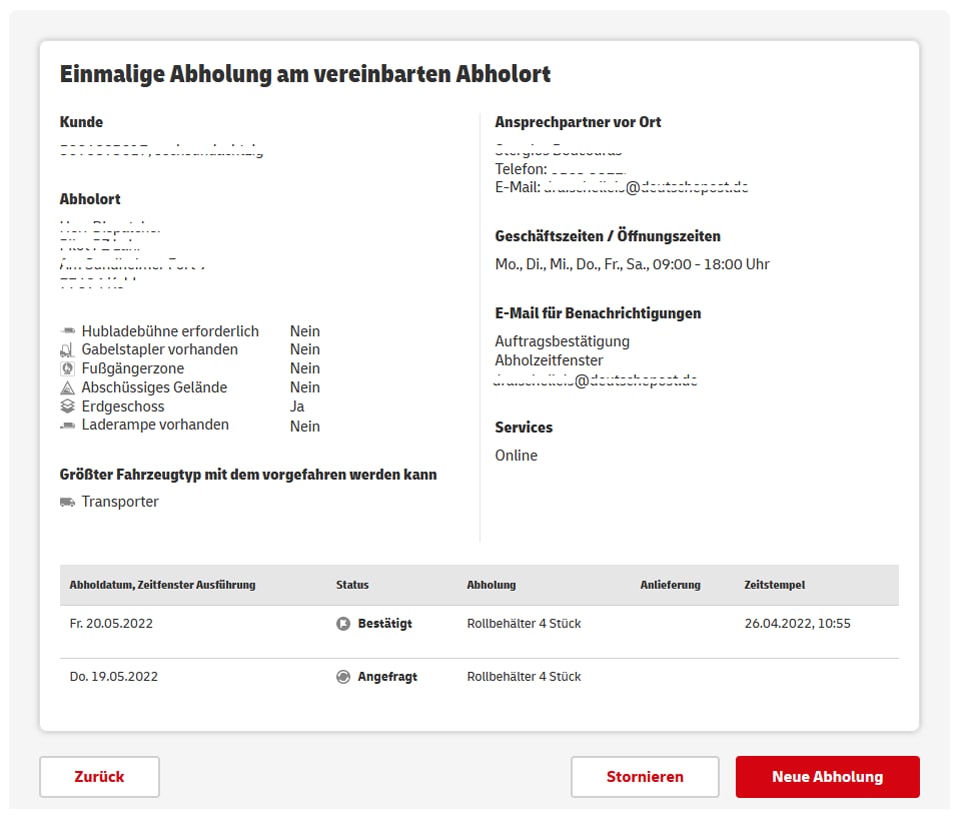
2. The "Order details" are redesigned

  • "Conditions at the pickup location" at the time of the order were supplemented
  • "Opening hours" are now additionally displayed
  • Ordered "notification details" are output
  • Request and confirmation details are output in tabular form

3. The detail view for agreed pickup locations ("Settings") is revised

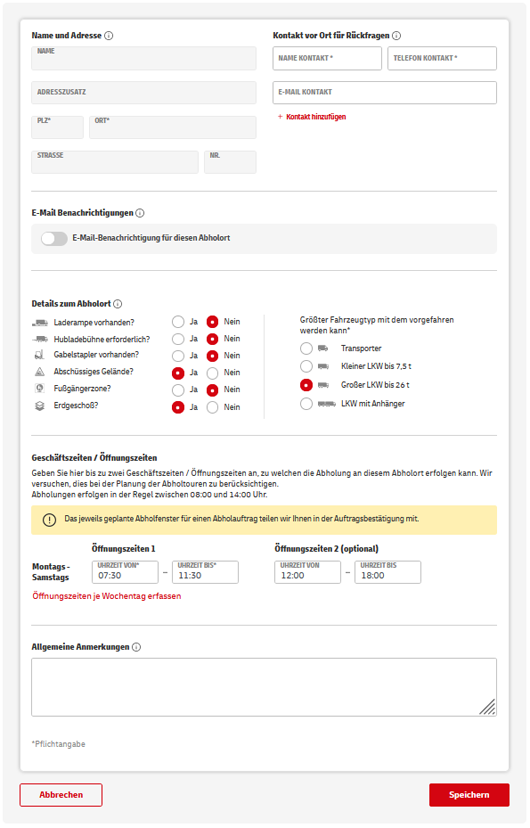
  • Details that are required for the collection of more than 10 parcels but have not been maintained are marked accordingly when the pickup location details are called up
  • The entry screens for e-mail notifications and pickup location details have been redesigned
  • Business hours / opening times can now be entered per working day

Please also note:

  • Pickups of more than 10 parcels, bulky goods, roll containers, swap bodies or pallets at agreed pickup locations ("Singular collections") are always subject to a separate review
  • Editing of Singular collections is therefore not possible, please cancel the order in these cases and place a new one
  • Customer references may now have a maximum length of 20 characters

FAQ

The pickup costs at the pickup locations agreed with DHL are included in the price of the parcel. If a desired pickup location is not available for you to choose from in the "Pickup" function, please contact your DHL sales representative.

Pickups of parcels or returns from third-party addresses are billed separately by DHL (individual collection order, service "Einzelabholauftrag").

As an option, DHL can also print the shipping label and bring it to the pickup. This requires an account number in process 08 (DHL Retoure with pickup). If these details have not been agreed, please contact your DHL sales representative.

You may be asked to complete your pickup location when you order. There are more details in the document "Brief description: Complete pickup location".

Open the settings menu ("Einstellungen") and click on the agreed pickup location to make and save changes.

Please contact your DHL sales representative.

Provided your user has sufficient rights, you can still view, complete and edit all pickup location details under "Pickup" ➔ "Settings" ➔ "Pickup locations". 

If required, you can permanently link a previously created contact to a pickup location, then the data of this contact will be pre-set as "Contact person" for orders at this pickup location.

Users of the Post & DHL Business Customer Portal (GKP) can now also be authorized selectively for specific pick-up locations. For example, you can authorize employees at a location exclusively for pick-ups at the associated pick-up location.

To set the authorizations for a pick-up location of a GKP user, as a customer administrator in the GKP, select "Manage users" ➔ "User overview" from the "Personal menu" at the top right: Select user from list and click on pencil icon ➔ "Pickup".

1. You can use the paid service "Einzelabholauftrag" (individual collection order) to flexibly arrange for individual items (up to ten) to be picked up from any address in Germany and sent to an address of your choice. You can use the "Pickup" function ("Abholen") to book your individual collection order directly up to 14 days in advance or up to 10 p.m. the day before. There is an extra charge of EUR 2.50 per item and order number if you book the pickup with customer service by phone or e-mail.

Individual collection order service:

  • Extra charge:
    • With label EUR 1.99
    • Without label EUR 1.49
    • There is an extra charge of EUR 2.50 per item and order number if you book with customer service
  • Pickup and delivery are possible to any address in Germany that can be encoded to a routing code
  • Weight: up to 31.5 kg
  • Bulky items
  • Up to ten parcels or bulky items

2. Business customers can use a parcel collection on request ("Bedarfsabholung") and order the pickup of up to ten parcels from contractually agreed pickup locations/ business addresses. This service is available to all business customers who do not need regular pickups. Please ask your sales representative to set up a parcel collection on request for you.

Parcel collection on request:

  • Only possible from a pickup location agreed with you
  • Free of charge
  • Up to ten parcels
  • Weight: up to 31.5 kg
  • Dimensions: up to 120x60x60 cm

3. Singular collections ("Einmalige Abholungen") are pickups of more than 10 loose parcels or parcels consolidated on wheeled trays, swap bodies or pallets, or parcels exceeding the dimensions 120x60x60 cm (i.e. bulky items), from the agreed pickup location/ business address. Empty wheeled containers, swap bodies or pallets for pickups can also be ordered for the agreed pickup location.

Singular collections:

  • Only possible from a pickup location agreed with you
  • Free of charge
  • Bulky items
  • More than 10 loose parcels or parcels consolidated on wheeled trays, swap bodies or pallets
  • Delivery of empty wheeled trays, swap bodies or pallets

The Pickup > Grouped order function ("Abholen > Sammelauftrag") allows you define individual collection orders by uploading a prepopulated CSV file to the system. (You will find instructions for grouped orders in Downloads).

In the first selection box, select the account number for which multiple individual collections will be booked using the grouped order file. Make sure you do not change the CSV file format when you save the file. The file template is available for download on the forms page.

Up to 10 parcels can be picked up in a parcel delivery round. If there are more items, a special pickup may have to be scheduled.

No, all pickup orders can now be placed online in the Post & DHL Business Customer Portal.

Yes, please enter the e-mail address in the notification e-mail field ("E-Mail für Benachrichtigung").

You can now follow the live status of the pickup status of your individual pickup orders and pickup orders at request. You can track all pickups by a DHL deliverer of up to ten items across Germany.

You can access the tracking either

  • through pickup order management (Auftragsverwaltung) in the "Pick up" function (login to the Post & DHL Business Customer Portal required)
  • through the "Abholung live verfolgen" (Pickup live tracking) link button in the optional "Zeitfenster" (time window) confirmation e-mail that we send to up to two e-mail addresses on the day of the confirmed pickup (login to the Post & DHL Business Customer Portal not required).

With the new live tracking functionality, you will always be provided with the current and most important status information around your carrier pickup, similar to the familiar "shipment tracking":

  • Estimated pickup time (90 minutes window)
  • Remaining stops before your pickup
  • Current location of the driver in the vicinity

In rare cases, operational challenges affecting pickups (traffic, bad weather, general operational issues) may mean that we are unable to provide full information about the pickup order status within the live tracking function.

Please open the order management menu ("Auftragsverwaltung").

Follow these steps:

  1. Log into the Post & DHL Business Customer Portal and in the "Pickup" function ("Abholen"), choose order management ("Auftragsverwaltung") from the list.
  2. Select all the relevant orders by placing a check mark in the first column, then choose the export command ("Exportieren (CSV)") at the top for this selection.
  3. The CSV file (download) contains all the details of the selected orders.

For up to 10 parcels, orders can be placed up to 10 p.m. the day before.

For pickups of more than 10 loose parcels or parcels consolidated on wheeled trays, swap bodies or pallets, the following deadlines apply the day before: Monday - Thursday by 2.30 p.m., Friday by 1.30 p.m.

You can order 14 days in advance.

Up to 10 parcels can be picked up on Mondays through Saturdays (except for statutory public holidays). Pickups of more than 10 loose parcels or parcels consolidated on wheeled trays, swap bodies or pallets take place on Mondays through Fridays (except for statutory public holidays).

If no one is there at the time of the pickup, a new pickup order must be placed. Alternatively, items can be dropped off at a Deutsche Post retail outlet or in a Packstation.

Please note: If an individual collection is booked, the charge must be paid even if the DHL deliverer finds no one there. When you place a new individual collection order, you will be billed the charges again.

Capacity may be limited by large numbers of items and by the expectation of large numbers later in the week. As a result, it is temporarily not possible to order such pickups. Regular pickups and singular collections that have already been ordered will normally carry on. Please note also that the parcels originally intended for the special pickups cannot be picked up by the parcel carrier or added to the scheduled regular pickups.

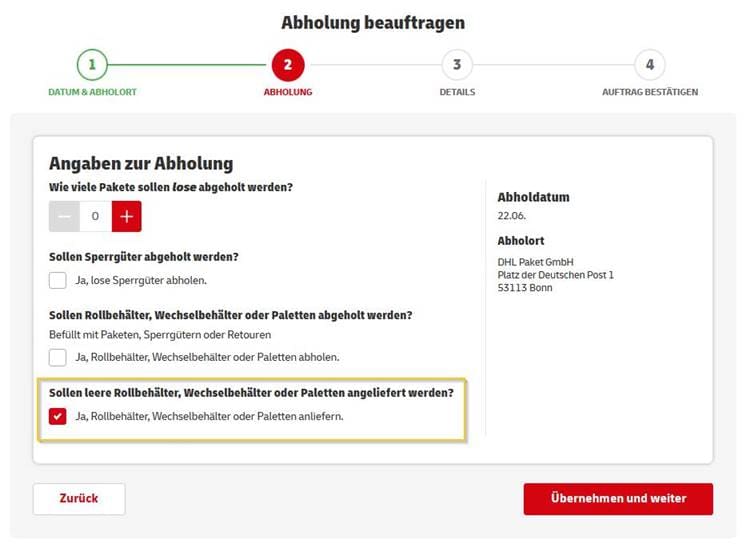
Specify the date and location in step 1. In step 2, select the option to deliver wheeled trays, swap bodies or pallets ("Ja, Rollbehälter, Wechselbehälter oder Paletten anliefern.") and specify the relevant quantity in step 3.

As an option, in the "Pickup" function ("Abholen"), you can use the Supplier Portal to authorize your suppliers and partners to order, at your expense, paid pickups of up to 10 parcels or bulky items per day and pickup address.

The authorized company or person does not need to be a business customer of DHL Paket. The pickups take place using the paid individual collection order service with label printing ("Einzelabholung mit Etikettendruck").

Please ask your Deutsche Post DHL Group sales representative to arrange for the Supplier Portal function ("Lieferantenportal") to be activated for your customer number.

You will then be able to set up the service in the Pickup/settings/supplier portal function ("Abholen/Einstellungen/Lieferantenportal") in the Post & DHL Business Customer Portal.

There are three steps in the setup:

  1. Activate and save the Supplier Portal ("Abholen/Einstellungen/Lieferantenportal")
  2. Create a new address book entry or activate (an) existing one(s) for the Supplier Portal ("Abholen/Einstellungen/Adressbuch")
  3. Enter the e-mail address of your supplier(s) and send access data ("Abholen/Einstellungen/Lieferantenportal")

Please inform new suppliers in particular that you would like pickups and parcel deliveries to be arranged through the Supplier Portal.

How can suppliers place orders?

  • Your suppliers are e-mailed the access data they need after step 3 of the setup process.
  • Orders are placed in a secure website protected by an access code.
  • To log on, the postal code of the destination is always required in addition to the access code.

The business customer sets it up in three steps:

  1. Activate and save the Supplier Portal ("Abholen/Einstellungen/Lieferantenportal")
  2. Create a new address book entry or activate (an) existing one(s) for the Supplier Portal ("Abholen/Einstellungen/Adressbuch")
  3. Enter the e-mail address of the supplier and send access data ("Abholen/Einstellungen/Lieferantenportal")

See the relevant presentation in Downloads.

Following setup, the access data for placing the order is e-mailed to suppliers from the Post & DHL Business Customer Portal.

Suppliers place orders in a secure website protected by an access code. To log on, the postal code of the destination is always required in addition to the access code.

Orders placed by suppliers can be viewed in the "Pickup" function ("Abholen") in order management ("Auftragsverwaltung") under the business customer's customer number (EKP).

This invalidates the URL and/or code which was previously in use. Suppliers will no longer be able to log on with the old URL/code. Please only generate a new code and/or a new URL if you want to prevent certain suppliers using your Supplier Portal. You will then have to send the regenerated access data to all the suppliers you want to still be able to access the portal.

For Warenpost, the pickup service is included in the price from a volume of 6,000 items per year. Customers with smaller volumes must post the Warenpost items themselves. Items up to 3 cm thick can be posted via letterboxes and all Warenpost items can be dropped off in a Deutsche Post retail outlet. Your sales representative can set up regular pickups of Warenpost items. For a Singular Collection, please use the form which is available for download if the pickup is included in the price.

Downloads