

MyBill help

Using MyBill & invoice-related questions

If you are registered for the DHL e-Billing service, you can automatically access the MyBill portal. MyBill is the user-friendly portal of DHL Express with which you can view and download all your invoices online. As soon as an invoice has been created, you receive an e-mail with the invoice attached in PDF format and a link to the MyBill website. There you can view your invoices and download them in various file formats.

You can download the MyBill User Guide here. There you will find illustrated, step-by-step instructions to the MyBill functions and the management of your profile settings and DHL e-Billing users.

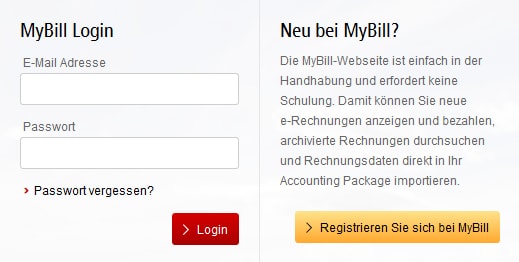
Your username is the e-mail address with which you registered. You can choose your password yourself. If you have forgotten your password, simply enter your e-mail address in the log-in field at mybill.dhl.com/login as your user name and click on "Forgot your password?" Enter your e-mail address on the following page. You will subsequently receive an e-mail with a temporary password.

In MyBill, you can view transport and customs invoices as well as all accompanying documents for your account number(s) and download them in various file formats.

Your online history in MyBill begins with the first invoice you received electronically after your initial registration for DHL e-Billing. No history is available in MyBill for invoices you received prior to that.

Step 1: Click on the link mybill.dhl.com/login. This takes you directly to the MyBill portal. Enter your username and password. Your username is the e-mail address with which you registered for DHL e-Billing.

Step 2: You are taken directly to the invoice overview.

Step 3: Click on the respective invoice for which you would like to view the shipment details, or simply download the invoice.

The invoices can be downloaded in various file formats (PDF, XML and CSV file – for import into other applications such as your merchandise management systems). You will find step-by-step instructions on this in the MyBill User Guide.

Various CSV formats are available in MyBill:

For transport invoices:

  • CSV: several lines of data for each waybill enable freight fees and surcharges to be broken down.

  • Standard CSV: all data in one line.

  • You can also create a personalized CSV format. See the MyBill CSV Guide. for more details.

The standard CSV format is available for customs invoices; in contrast to transport invoice CSV files, however, it cannot be personalized. You can also consult the MyBill CSV Guide to see which data and columns are contained in the standard CSV.
 

Log into MyBill and select in the invoice overview the customs invoice for the shipment in question (invoice number begins with the abbreviation ZIT). Click on "Download" and check “Customs documents” in the download selection that appears. You will find step-by-step instructions on this in the MyBill User Guide.

If you still receive your customs invoices in paper form, a corresponding download link to the MyBill portal (including access code) will be stated on the invoice. You can then view your supporting customs documents via that link.

Did you know that you can also receive the supporting customs documents for your import shipments by e-mail with the e-Paperwork service? Simply register free of charge here.

Your customs invoices and supporting customs documents are usually available at DHL e-Billing and e-Paperwork within 24 hours after customs clearance. This enables you to review your imports in a timely manner.

If you would like to process your imports through your own deferment account, please contact your sales representative to ensure that the information is forwarded directly to our customs clearance experts in Leipzig. Please enter your EORI number and e-mail address to ensure that this information can be stored in the corresponding customs clearance system. For import shipments processed through your own deferment account, the supporting customs documents are not sent through DHL e-Billing but rather through a different system. For this reason, the e-mail with which you receive your documents looks slightly different.

Yes. Simply go to the invoice overview that appears immediately after you log in to MyBill, select the desired invoice and then click on the respective air waybill number (AWB). An image of the waybill will then be displayed.

No, these functions currently are not available.

Please contact your sales representative if you would like to use the SEPA direct debit procedure.

Registration, profile settings and user management

If you have not yet registered for DHL e-Billing, you can do so via this link and immediately receive your invoices by e-mail. And with e-Paperwork, you can receive all the supporting customs documents for your import shipments.

If you or your company already use DHL e-Billing and would like to add additional users for this service, you can do so either using this form or by logging into MyBill and adding the additional users in the "My account" tab. See the MyBill User Guide for more details.

The stored e-mail address cannot be amended in your account settings in MyBill. In this case, contact us directly by sending an e-mail to rechnung-de@dpdhl.com or zollrechnung-de@dpdhl.com , or get in touch with your DHL Express sales representative.

No. Please notify us of all changes to your official company data by contacting DHL Express customer service or your sales representative.

No. Please contact your DHL Express sales representative for this.

Technical problems & settings

Yes. We use a combination of digital signatures and a highly effective encryption technology to ensure security.

All you need is internet access to register for MyBill and use Adobe Acrobat as a PDF reader to view invoices online. As MyBill is web-based, you do not need to install any additional software.

Make sure your spam/junk filter isn’t blocking e-mails from the following address: rechnung.de@dhl.com

If the problems persist, add the following IP addresses and domain names used for invoice transmissions to your whitelist:

IP addresses:

85.90.252.61

109.234.201.207

Domain names:

Domain names used by us for transmission are fundtech.com, accountis.com, accountis.net and dhl.com

Further error sources related to the receipt of e-Billing invoices can be found here.

Original documents and tax law aspects

Yes, e-Billing invoices comply with VAT law: DHL e-Billing invoices and all other documents made available through MyBill are certified and legally compliant original documents that satisfy the relevant VAT provisions for customs clearance as well as of the EU and Germany.

Yes, the transmitted customs duty notification is an original document. Imports at DHL Express are carried out using the customs-certified ATLAS IT system, which satisfies the requirements for automated processing stipulated by the General Directorate of Customs according to Article 6 Paragraph 1 of the Union Customs Code (UCC). All customs declarations are therefore transmitted electronically to the customs office and also returned electronically. The customs declaration is created in PDF format by the customs-certified IT interface, and in this case is the original document. The customs declarations transmitted through DHL e-Billing therefore are original documents just like the printed versions.

Yes, according to Section 15.11 (1) 2. of the VAT Application Decree ("Umsatzsteuer-Anwendungserlass"), for imports processed through the ATLAS IT procedure there are no concerns about providing this verification electronically or, if needed, as a printout of the electronically transmitted declaration of the import duties (see Article 52 of the Value Added Tax (VAT) Decree (MwStVO). If there are doubts about the amount of import sales tax deducted as input tax, the tax offices can request information using the procedure provided by the German Federal Central Tax Office for online queries of import data saved in the ATLAS process.

Proofs of preference (such as EUR.1, A. TR or Form A) generally remain attached to the shipment. If customs insists that the preferences be presented, they are removed from the shipment, presented to customs and then delivered by post.

Please also keep in mind that there is now a new electronic procedure (REX) that is designed to replace paper documents in the future. It is being introduced in several stages. There are 5 blocks (time windows) overall in which each time, several countries will apply the REX procedure and shippers can register there. The original documents (ATR, EUR 1, etc.) will therefore gradually be replaced by a number on the commercial invoices. A transition period lasting several years has been defined for the changeover; it began on January 1, 2017, and is scheduled to end on December 31, 2020.

The invoice in PDF format includes an electronic signature which ensures that the invoice was issued by DHL.

FAQs about the DHL e-Billing service

No, you will no longer receive paper invoices but of course can print out your invoices if necessary.